Last updated: July 2026
Otter.ai has become one of the default names in AI meeting transcription. It joins Zoom, Google Meet, and Microsoft Teams calls without any extra setup, which explains most of its popularity. This Otter.ai review looks at what the platform actually delivers in 2026, breaks down its minute-cap pricing, and compares it honestly against newer competitors.
What Is Otter.ai?
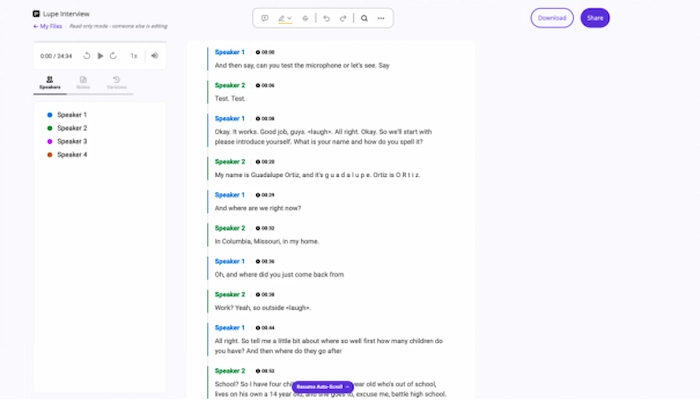
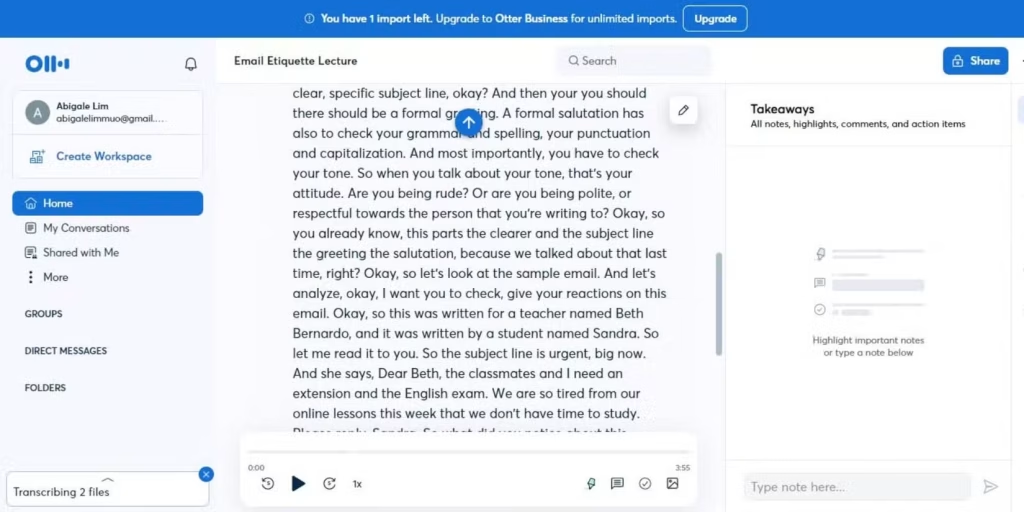
Otter.ai is an AI meeting assistant. It records, transcribes, and summarizes conversations in real time, whether that’s a video call, an in-person interview, or a lecture. Beyond basic speech-to-text, Otter.ai offers speaker identification, keyword search across past transcripts, and AI-generated summaries. As a result, Otter.ai positions itself as a full meeting-productivity assistant rather than a simple transcription tool.
Otter.ai’s core strength is its native bot integration. Rather than requiring manual recording, Otter.ai joins Zoom, Meet, and Teams calls directly and starts transcribing automatically. According to G2’s review data, Otter.ai holds a 4.4-star rating across 462 reviews, with users consistently praising its real-time accuracy.
Otter.ai Pricing: Every Plan Explained
Otter.ai’s pricing looks simple at first glance. However, the real cost depends heavily on minute caps that aren’t obvious from the marketing page alone.
| Otter.ai Plan | Price | Monthly minutes | Per-conversation cap |
| Basic (Free) | $0/month | 300 miutes | 30 minutes |
| Pro | $16.99/month ($8.33/month billed annually) | 1200 minutes | 90 minutes |
| Business | $30/month ($19.99/month billed annually) | 6000 minutes | 4 hours |
| Enterprise | Custom ($15,000–$35,000/year) | Unlimited | Unlimited |
Otter.ai also offers a 20% student discount on Pro, bringing the annual price down to roughly $6.67/month.
Several billing details deserve attention before subscribing. First, Otter.ai offers no pay-as-you-go overage. Once you hit your monthly cap, transcription simply stops until the next cycle. Second, unused minutes don’t roll over; light months don’t bank forward. Third, the free plan’s 3 lifetime file imports are a one-time allowance, not a monthly reset. Finally, Otter.ai cancellations are non-refundable even mid-cycle, and some users report billing continuing shortly after cancelling — worth double-checking your account settings after cancelling.
Otter.ai Features: What You Actually Get
Otter.ai’s feature set extends well beyond raw transcription.
Real-time transcription with bot integration. Otter.ai’s bot joins calls automatically, the single feature most reviewers highlight as its strongest advantage. Unlike tools requiring manual recording or file uploads, Otter.ai handles the entire process without any action from meeting participants.
Speaker identification. Otter.ai automatically distinguishes speakers, labeling transcripts without manual tagging. This becomes especially useful in group calls, where matching statements to the right person manually would otherwise take considerable time.
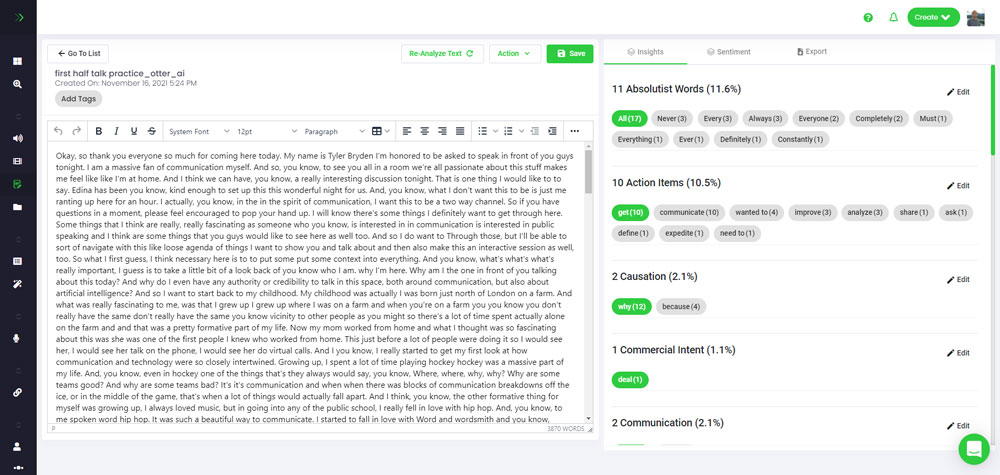
AI-generated summaries. After each meeting, Otter.ai produces a summary highlighting key points and action items, reducing the need to re-read a full transcript to extract what matters most.
Keyword search. Otter.ai indexes past meetings, letting you search for terms discussed weeks earlier. This turns Otter.ai into a searchable archive rather than a one-time transcription tool.
Sales integration. On Enterprise, Otter Sales Notetaker syncs call insights directly to Salesforce or HubSpot, removing the need for manual note transfer after every sales call.
Collaborative highlighting. Team members can comment and highlight sections of a shared transcript in real time, turning a single Otter.ai recording into a genuinely collaborative meeting record rather than a personal note file.
Otter.ai Strengths
Best-in-class live capture. Otter.ai’s bot integration across Zoom, Meet, and Teams remains its clearest differentiator, and reviewers consistently rate this workflow as the platform’s strongest feature overall.
A genuinely useful free tier. 300 monthly minutes lets occasional users test accuracy before paying anything, which is more generous than several competitors offer at no cost.
Strong summaries and search. These features add real organizational value for teams with recurring meetings, turning scattered conversations into a searchable, structured record over time.
Established reputation. A 4.4/5 G2 rating across hundreds of reviews reflects consistent satisfaction specifically around live transcription accuracy.
Otter.ai Weaknesses
Hard minute caps, no overage. Otter.ai simply stops transcribing at your limit, forcing an unplanned upgrade during a busy month. Unlike some competitors offering pay-as-you-go top-ups, there’s no way to pay a little extra to finish out a heavy week.
No rollover. Inconsistent usage means real value goes unused every cycle. A month with only 400 of 1,200 minutes used doesn’t bank the remaining 800 forward.
Narrow language support. Otter.ai performs best in English, French, and Spanish only, which becomes a real limitation for teams working primarily in other languages.
Undercut on raw value. As detailed below, at least one competitor offers meaningfully more minutes per dollar, which matters for budget-conscious teams comparing options carefully.
Otter.ai vs. Fireflies.ai
The most direct value comparison is Fireflies.ai, which offers 800 free monthly minutes and a $10/month Pro tier with 8,000 minutes — over 6x Otter Pro’s allowance at a lower price. On pure volume per dollar, Fireflies currently wins clearly.
Otter.ai still holds ground on bot maturity and summary quality specifically within Zoom, Meet, and Teams. If your meetings run primarily in English, French, or Spanish, and you’ll use most of your monthly allowance consistently, Otter.ai remains competitive. Otherwise, comparing Fireflies.ai directly before subscribing is worthwhile, especially for teams whose usage varies significantly month to month.
Who Is Otter.ai Actually For?
Teams with predictable meeting schedules get the most consistent value from Otter.ai’s structure, since Pro and Business plans price around steady monthly usage rather than occasional bursts.
Sales teams benefit from Enterprise’s CRM sync into Salesforce or HubSpot, removing manual note transfer from the daily workflow entirely.
Students can make good use of the discounted Pro plan, particularly given Otter.ai’s strong real-time transcription accuracy for lecture notes.
High-volume users on a budget should compare Fireflies.ai first, given the meaningful gap in included minutes at a similar price point.
Multilingual teams working outside English, French, or Spanish are generally better served by a competitor like Sonix instead.
Frequently Asked Questions About Otter.ai
Is Otter.ai free to use? Yes. Otter.ai’s free Basic plan includes 300 monthly minutes, capped at 30 minutes per conversation.
How much does Otter.ai Pro cost? Otter.ai Pro costs $16.99/month, or $8.33/month billed annually.
What happens when I hit my Otter.ai minute limit? Transcription stops until your plan resets or you upgrade. There’s no overage option.
Do unused Otter.ai minutes roll over? No. Unused minutes reset at each billing cycle rather than carrying forward.
Is Otter.ai better than Fireflies.ai? It depends on priorities. Fireflies.ai offers far more minutes per dollar, while Otter.ai holds an edge in bot maturity within major video platforms.
Does Otter.ai support multiple languages? Coverage is limited mainly to English, French, and Spanish. Broader needs are better served elsewhere, particularly by a competitor like Sonix, which supports over 50 languages.
Can I try Otter.ai without a credit card? Yes. The free Basic plan requires no payment information to sign up, making it genuinely low-risk to test Otter.ai’s transcription accuracy before committing to any paid tier.
Getting the Most Out of Otter.ai
A few habits make Otter.ai meaningfully more useful. First, track your monthly usage proactively, since there’s no overage or rollover to fall back on. Second, end recordings promptly once a meeting wraps up, since an idle bot still consumes minutes against your monthly allowance. Third, use keyword search instead of re-reading full transcripts — it’s faster and often overlooked by newer users. Finally, review AI summaries before sharing them, since overlapping speakers can occasionally confuse the automatic summary, and a quick check avoids passing along an inaccurate action item to the whole team.
Otter.ai for Sales Teams: A Closer Look
Sales teams deserve special attention, since Otter.ai’s Enterprise tier targets them directly. Otter Sales Notetaker extracts deal insights from calls and syncs them straight into Salesforce or HubSpot. As a result, a rep no longer needs to manually type notes after every call, or worse, forget to log a conversation entirely.
However, this feature sits exclusively behind Enterprise pricing, which typically starts around $15,000 per year. For a small sales team, that cost only makes sense once manual note-taking is genuinely costing meaningful time across the team. Smaller teams often start on Business instead, using Otter.ai’s standard transcription and summaries manually, then upgrading to Enterprise once CRM automation becomes worth the investment.
In practice, the decision comes down to team size and call volume. A five-person sales team making a handful of calls weekly may not need Enterprise at all. A twenty-person team running dozens of calls daily, however, often recovers the Enterprise cost quickly through saved admin time alone. Sales managers evaluating this tradeoff should track roughly how many hours per week the team currently spends on manual note-taking, then compare that time cost directly against Enterprise’s annual price before deciding.
Otter.ai Alternatives Worth Knowing
Otter.ai isn’t the only serious option, and it helps to know where the alternatives stand. Fireflies.ai, covered above, remains the closest direct competitor on raw transcription value. Beyond that, tl;dv bundles AI summaries and CRM integrations directly into its free tier, appealing to teams that want more included without paying immediately. Fathom offers unlimited free transcription for individuals on Zoom, Meet, and Teams, though its CRM integration list is shorter than Otter.ai’s. Sonix, meanwhile, supports over 50 languages and uses pay-as-you-go pricing rather than a fixed subscription, making it a stronger fit for multilingual teams or highly variable usage.
For most teams, the decision comes down to priorities. Otter.ai wins on bot maturity and summary polish within the three major video platforms. A narrower or cheaper tool might edge ahead on one specific need, like raw minutes per dollar or language coverage, but few competitors match Otter.ai’s combination of transcription accuracy and seamless meeting-bot integration. Teams already standardized on Zoom, Meet, or Teams specifically tend to find Otter.ai’s native integration worth the premium over cheaper, more generic alternatives.
Our Final Verdict on Otter.ai
Bringing this Otter.ai review together, here’s how it scores across the categories that matter most:
| Category | Score (out of 5) | Why |
| Live transcription accuracy | 4,5 | Consistently praised as Otter.ai’s strongest feature |
| Pricing transparency | 3 | Hard caps and no rollover make cost harder to predict |
| Feature depth | 4 | Summaries and search add real organizational value |
| Value per dollar | 3 | Meaningfully undercut by Fireflies.ai |
| Ease of use | 4,5 | Native bot integration requires minimal setup |
| Overall | 3,8/5 | A polished meeting assistant, thought no longer th clear value leader |
Bottom line: Otter.ai remains dependable for teams meeting consistently in English, French, or Spanish across major platforms. Anyone prioritizing raw minutes per dollar should compare Fireflies.ai directly first.
_________________________________________________________________________________________________________
Transparency note: This Otter.ai review draws on the platform’s official pricing page, verified G2 review data, and independent 2026 pricing analyses, rather than first-hand, long-term use across every paid tier. Pricing and policies change over time — always confirm current details on Otter.ai’s official pricing page before subscribing.