Last updated: July 2026
Grammarly review 2026: full pricing breakdown, Free vs Pro vs Enterprise plans, key features, and our honest final verdict on this AI writing tool.
Grammarly is the most widely used AI writing tool on this list. It sits quietly inside almost every app people already write in, from Gmail to Google Docs. This Grammarly review skips the marketing language and answers what actually matters in 2026: what Grammarly costs now, what changed in its recent pricing overhaul, and whether Pro is genuinely worth the upgrade.
What Is Grammarly?
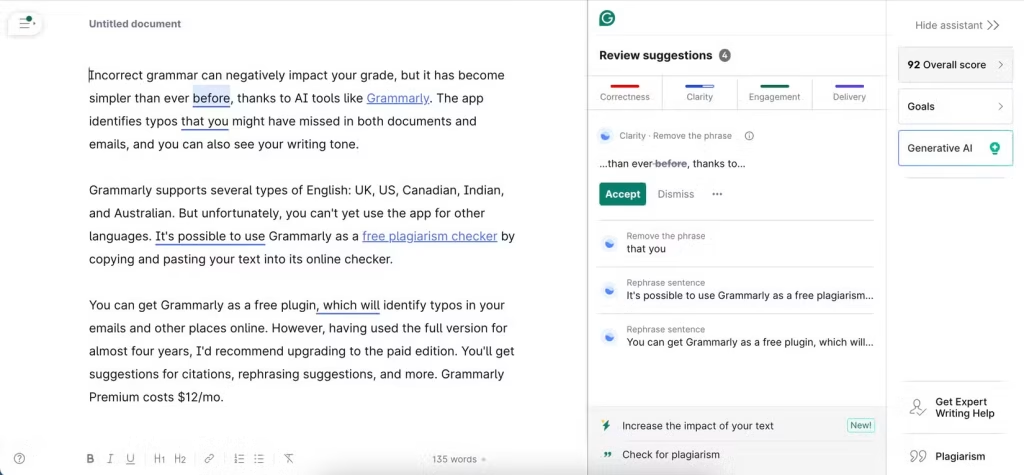
Grammarly is an AI writing assistant. It checks grammar, spelling, and punctuation in real time. It also offers tone adjustment, full-sentence rewrites, clarity suggestions, and plagiarism detection. Grammarly runs as a browser extension, a desktop app, and a native add-on inside Google Docs, Microsoft Word, Gmail, Outlook, and Slack. As a result, Grammarly rarely asks you to change how or where you write; it simply shows up inside the tools you already use.
According to Grammarly’s own reporting, roughly 40 million people and 50,000 organizations use the platform today. Well-known customers include Atlassian, Databricks, Zoom, HackerOne, and Zapier. That scale matters, because a writing assistant like Grammarly improves as it sees more diverse writing across more industries.
How Grammarly’s Pricing Changed in 2026
Grammarly’s pricing looks different than it did a year or two ago. First, Grammarly renamed its old “Premium” tier to “Pro.” Second, it folded most of what used to require a separate “Business” plan directly into Pro. Third, it replaced Business entirely with a custom-quoted Enterprise tier. In short, individual Grammarly subscribers in 2026 now get team-oriented features — style guides, brand tones, and usage analytics — that previously required a business-level subscription.
Grammarly Pricing: Every Plan Explained
Grammarly currently offers three tiers. Here’s exactly what each one includes.
| Grammarly Plan | Price | AI prompts | Key features |
| Free | $0/month | 100/month | Grammar, spelling, and punctuation checks; tone detection; conciseness suggestions |
| Pro | $12/month billed annually ($144/year), or $30/month billed monthly | 2,000/month | Clarity rewrites, tone and fluency adjustments, plagiarism detection, full-sentence rewrites, style guides, brand tones, usage analytics |
| Enterprise | Custom (typically 150+ seats) | Custom | SAML SSO, SCIM provisioning, BYOK encryption, data loss prevention |
The gap between monthly and annual billing on Grammarly Pro is steep. Paying month-to-month costs $30; committing annually brings the effective price down to $12 — a 2.5x difference. For that reason, annual billing is the clear default choice for anyone using Grammarly beyond a short trial.
The jump from 100 to 2,000 monthly AI prompts is the detail that makes upgrading feel worthwhile. For occasional writers, 100 prompts on the free Grammarly plan covers basic proofreading comfortably. For daily writers, however, that ceiling arrives fast, and the 20x increase on Pro reflects real usage rather than an arbitrary premium gate.
Grammarly Features: What You Actually Get
Grammarly’s feature set has grown well beyond spellcheck. Here’s what each tier unlocks in practice.
Real-time grammar and spelling correction. This is the baseline feature, available even on the free Grammarly plan, and still the most common reason people first install it.
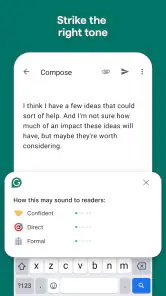
Tone detection and adjustment. Grammarly analyzes a draft’s tone — formal, confident, friendly, tense — and suggests rewrites to better match the intended audience.
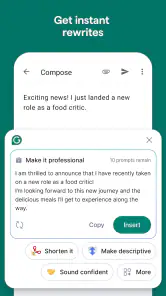
Full-sentence AI rewrites. Instead of only flagging word-level errors, Grammarly Pro rewrites entire sentences for clarity, concision, or tone. In effect, it functions like a lightweight AI writing partner rather than a simple checker.
Plagiarism detection. Pro includes a plagiarism checker that scans your text against a large database of published content, useful for students and professional writers alike.
Style guides and brand tones. Previously a Business-only feature, this now sits inside Pro. It lets writers and teams define a consistent tone that Grammarly applies across every suggestion.
Broad app integration. Grammarly works natively across a million-plus applications, so it rarely requires a separate writing environment.
Grammarly Strengths
Several things stand out consistently across reviews.
A genuinely useful free tier. Grammarly’s free plan covers real-time grammar, spelling, and basic tone detection at no cost — more capable than most competing free tools.
Deep app integration. Because Grammarly works inside Gmail, Docs, Word, and Slack natively, it rarely requires changing your existing workflow.
Strong review consensus. According to G2’s review data, Grammarly holds a 4.7-star rating across nearly 13,000 reviews. Capterra reports an identical 4.7/5 score, which is a strong, consistent signal for a tool under this much scrutiny.
Clear, predictable tiers. Unlike some AI tools with unpredictable feature gating, Grammarly’s three-tier structure is easy to understand.
Grammarly Weaknesses
No tool is perfect, and Grammarly has some real drawbacks worth knowing.
Consumer sentiment is more mixed than B2B sites suggest. While G2 and Capterra both show Grammarly at 4.7/5, Trustpilot tells a different story, with a more mixed 3.5/5 across over 10,000 reviews. This gap matters: G2 and Capterra skew toward business buyers, while Trustpilot captures a broader consumer audience, including billing and cancellation complaints.
A steep monthly-to-annual pricing gap. Paying $30/month instead of $12/month annually is a 2.5x premium, which can feel punishing if you’re not ready to commit for a year.
Prompt caps still apply on Pro. Even 2,000 monthly AI prompts can run out for extremely heavy daily users of the rewrite features.
No mid-tier for teams anymore. Teams that once used the Business plan now face a bigger jump straight to custom Enterprise pricing.
Grammarly vs. ProWritingAid
The most natural comparison for Grammarly is ProWritingAid. ProWritingAid’s annual plan runs slightly cheaper and also offers a one-time lifetime purchase, appealing to writers who dislike subscriptions. Grammarly, however, pulls ahead for everyday business writing: broader app integration, faster suggestions, and stronger tone rewriting for emails. ProWritingAid tends to edge ahead for long-form authors, thanks to deeper style reports built for manuscript-length work. In short, if your writing is mostly emails and reports, Grammarly fits better; if you’re editing a novel, ProWritingAid may serve you better.
Who Is Grammarly Actually For?
Professionals writing daily emails and reports get the clearest value from Grammarly, especially once the free plan’s 100 prompts start feeling restrictive.
Students and academic writers benefit from plagiarism detection and clarity rewriting on Pro.
Content marketers use Grammarly’s tone detection to keep a consistent voice across multiple writers.
Larger organizations with compliance needs should plan for an Enterprise conversation, since SSO and BYOK sit exclusively behind that tier.
Casual writers may find the free Grammarly plan genuinely sufficient without ever needing to upgrade.
Frequently Asked Questions About Grammarly
Is Grammarly free to use? Yes. Grammarly’s free plan includes real-time grammar, spelling, and punctuation checking, along with 100 AI prompts per month, and no credit card is required.
How much does Grammarly Pro cost? Grammarly Pro costs $12/month billed annually ($144/year), or $30/month billed monthly.
Is Grammarly Business still available? No. Grammarly discontinued Business in 2026, folding its team features into individual Pro plans and replacing true team needs with custom Enterprise pricing.
Does Grammarly work in Google Docs and Word? Yes. Grammarly integrates natively with Google Docs, Microsoft Word, Gmail, Outlook, and Slack, plus over a million other applications.
Is Grammarly worth upgrading to Pro? For daily writers, yes. The jump from 100 to 2,000 monthly AI prompts, plus full-sentence rewrites and plagiarism detection, tends to feel worthwhile quickly.
Why do Grammarly’s ratings differ between review sites? G2 and Capterra both show 4.7/5, reflecting business users. Trustpilot shows a more mixed 3.5/5, reflecting a broader consumer base.
Getting the Most Out of Grammarly
A few habits make Grammarly meaningfully more useful.
First, set your goals before writing. Grammarly’s tone and audience settings shape every suggestion it makes, so skipping this step often leads to generic corrections. Second, review suggestions rather than accepting them automatically; Grammarly’s rewrites are strong, but not infallible. Third, use the browser extension everywhere, not just in one app, since Grammarly’s value compounds across your entire workflow. Finally, track your monthly prompt usage on the free plan, so you know whether Pro is worth it before you hit a wall mid-project.
Grammarly for Teams: What Changed in 2026
Teams deserve a closer look, since Grammarly’s 2026 restructuring affected them the most. Previously, a team needed the separate Business plan to get style guides and brand tones. Now, those same features live inside individual Pro seats. As a result, a small team can equip each writer with Pro and still get consistent tone across the group, without paying for a dedicated team tier.
However, this approach has a real limit. Grammarly Pro remains an individual subscription at heart. It doesn’t include centralized team billing, shared seat management, or admin-level usage reporting across multiple accounts. For that, a company still needs Enterprise, which requires a custom quote and typically expects meaningful seat counts before Grammarly’s sales team engages seriously.
In practice, this means a five-person marketing team can often equip everyone with individual Grammarly Pro accounts for less than a single Enterprise contract would cost. Larger teams, especially those needing single sign-on or centralized billing, should budget for Enterprise conversations early rather than assuming Pro will eventually scale to cover those needs. Meanwhile, freelancers and solo consultants sit comfortably at the opposite end of this spectrum: a single Grammarly Pro seat covers everything they need, with no team-tier complexity to think about at all.
Grammarly Alternatives Worth Knowing
Grammarly isn’t the only serious option, and it helps to know where the alternatives stand. ProWritingAid, covered above, remains the closest direct competitor for long-form writers. Beyond that, some writers use QuillBot specifically for paraphrasing and quick rewrites, though it lacks Grammarly’s depth in real-time grammar checking across so many apps. Others rely on the built-in editors inside Google Docs or Microsoft Word, which cover basic spelling and grammar but fall well short of Grammarly’s tone detection and full-sentence rewrite capabilities.
For most people weighing these options, the decision comes down to breadth versus depth. Grammarly wins on breadth: it works everywhere, checks everything, and adjusts tone intelligently. A narrower tool might edge ahead for one specific task, like heavy paraphrasing or manuscript-length editing, but few competitors match Grammarly’s combination of real-time coverage and app integration.
Our Final Verdict on Grammarly
Bringing this Grammarly review together, here’s how it scores across the categories that matter most:
| Category | Score (out of 5) | Why |
| Grammar & writing accuracy | 4,7 | Consistently strong across G2 and Capterra |
| Pricing transparency | 4 | Clear three-tier structure, though the billing gap is steep |
| Feature depth (Pro) | 4,5 | Rewrites, tone adjustment, and plagiarism detection are genuinely useful |
| App integration | 5 | Works natively across a million-plus apps |
| Value for money | 4 | Free tier is useful; Pro’s annual price is competitive |
| Overall | 4,4/5 | A dependable, deeply integrated writing assistant |
Bottom line: Grammarly remains the most practical everyday AI writing assistant for professionals, students, and content creators. The free plan is worth trying first, and Pro’s annual pricing delivers strong value once your writing volume outgrows the 100-prompt ceiling.
_________________________________________________________________________________________________________
Transparency note: This Grammarly review draws on Grammarly’s official pricing page, verified G2, Capterra, and Trustpilot review data, and independent 2026 pricing analyses, rather than first-hand, long-term use across every paid tier. Pricing and features change frequently — always confirm current details on Grammarly’s official pricing page before subscribing.